Trust, contacts, and professional requests
The lower portion of the public profile combines verification evidence, contact information selected by the holder, professional networks, and—in profiles that accept requests—the Business center.
Interpret the Trust Center
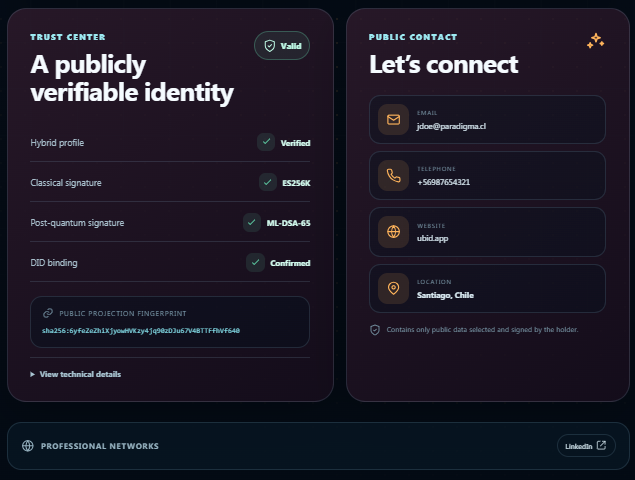
The Trust Center checks the signed public projection and reports:
- Hybrid profile — Verified: the required profile-signature policy passed;
- Classical signature — ES256K: the classical signature is valid;
- Post-quantum signature — ML-DSA-65: the post-quantum signature is valid;
- DID binding — Confirmed: the identity address and subject DID match the signed profile;
- Public projection fingerprint: the
sha256:digest that identifies the exact public projection being displayed.
Select View technical details to inspect the signature policy, profile-signature version, identity-address validation, and subject-DID validation. A green result refers to the integrity of the published projection; it does not independently certify every user-declared professional statement.
Contact the holder
The Public contact panel includes only fields that the holder explicitly made public, such as email, telephone, website, or location. Professional networks opens the published external profiles in a new tab. Missing contact channels are simply omitted.
Use Save contact on the profile card to create a vCard from the available public fields. Check the recipient and message before using email or WhatsApp.
Send a professional request
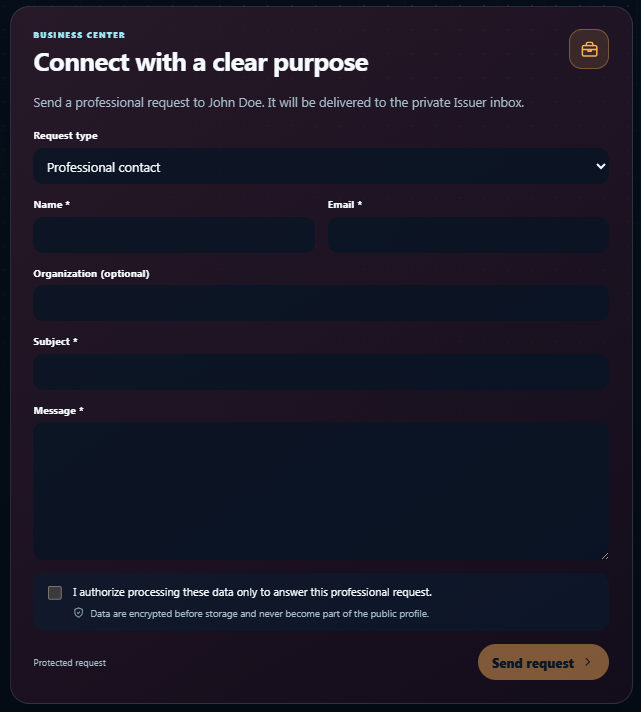
If the holder accepts requests, go to Business and complete the form:
- Choose Professional contact, Commercial proposal, or Meeting request. A meeting request also asks for a preferred date and time.
- Enter your Name and Email.
- Add an optional Organization.
- Enter a clear Subject and Message.
- Read and select the consent checkbox authorizing processing only to answer that request.
- Select Send request and keep the returned reference code.
The form uses a short-lived protected challenge. Sender data is encrypted before storage, delivered to the holder's authenticated private Issuer inbox, and never becomes part of the public profile. The holder can review, accept, decline, archive, or otherwise process the request according to the available workflow.
Do not include passwords, private keys, recovery material, complete credentials, or unnecessary identity-document data in the message. A professional request is private correspondence, not a credential-presentation channel. Use Request verifiable identity proof when verifiable attributes are required.
If the Business center is not shown, the holder has marked professional availability as unavailable or the feature is not enabled. Use an available public contact channel instead.