User public profile
The UbID public profile is the visitor-facing presentation available at the holder's *.ubid.app address. It does not require access to the holder's intranet. It shows only the signed public projection that the holder selected and published from My public profile.
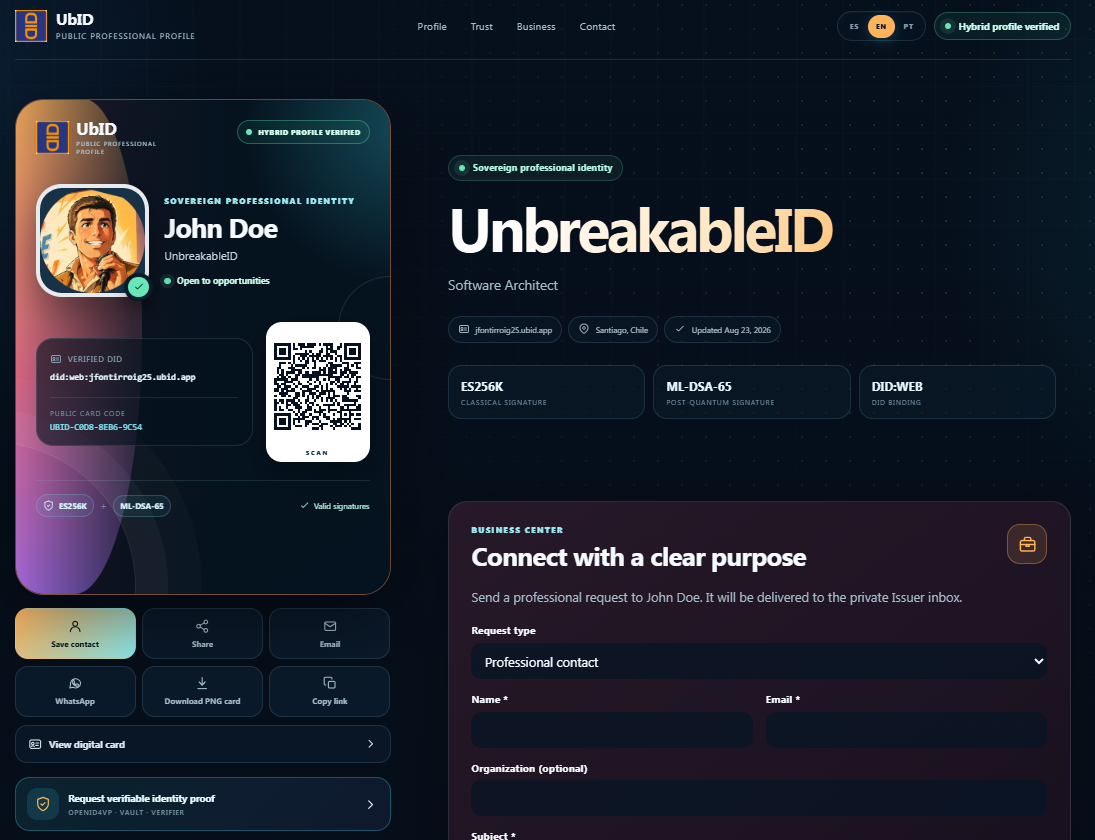
The names, contact details, dates, codes, and addresses shown in these images are examples. The available sections and buttons depend on what each holder has published and on the services enabled in the deployment.
Read the profile
The page can include:
- the holder's avatar, public display name, professional headline, availability, verified DID, and public card code;
- a QR code that opens the public profile;
- the public description, location, services, professional networks, and selected credential summaries;
- verification indicators for the classical signature, post-quantum signature, and DID binding;
- public contact methods and the Business center, when enabled by the holder.
Use the top navigation—Profile, Trust, Business, and Contact—to move directly to a section. Other entries, such as services or credentials, appear only when published. Use ES, EN, or PT to change the display language; this does not modify the holder's source data.
Use the profile card actions
| Action | Result |
|---|---|
| Save contact | Downloads a vCard (.vcf) containing the public contact data available for that profile. |
| Share | Opens the device's share menu. If it is unavailable, UbID copies the localized profile link. |
| Opens the default mail application with the profile link. If a public email exists, it is used as the recipient. | |
| Opens WhatsApp with the public-profile link and presentation text. | |
| Download PNG card | Downloads the current professional card as a PNG image. |
| Copy link | Copies the public-profile address in the selected language. |
| View digital card | Opens the expanded professional card and its export options. |
Request verifiable identity proof
When Request verifiable identity proof is available, a visitor can start a consent-based OpenID4VP flow through Vault and Verifier. The request identifies the holder's DID and the verification purpose. The holder reviews the request in Vault and decides whether to present the requested information.
The public page by itself does not release a complete credential. If the button is absent, the presentation-request service is not enabled for that profile or deployment.
Complete SD-JWTs, UR Code payloads, protected documents, biometrics, private keys, and account-recovery material are not part of the public projection. Before publishing or sharing, the holder should still review every field marked Public in the intranet.
Next, see Digital professional card or learn how the holder configures this information in Identity and public profile.