Vault settings and passkeys
Open Settings to review the current account and its access controls.
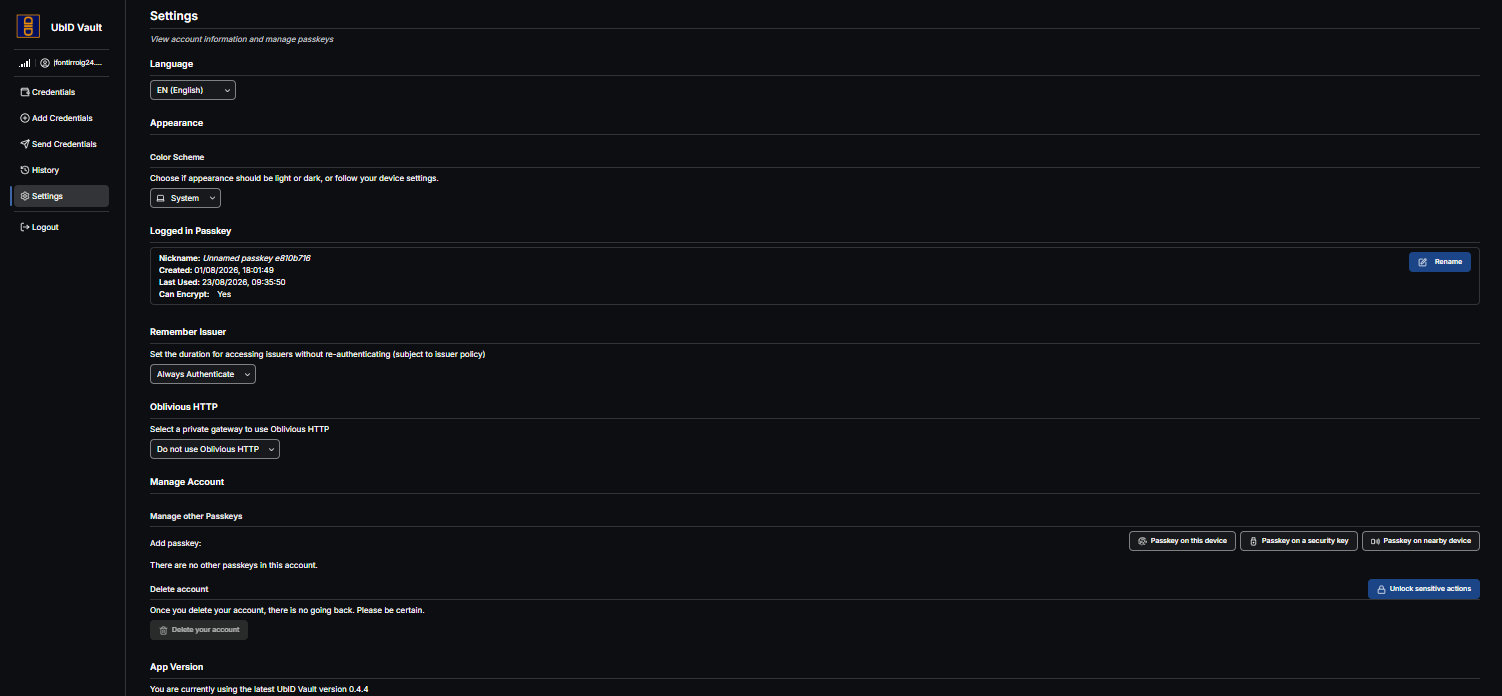
Language and appearance
- Language changes the Vault interface language.
- Color Scheme selects System, Light, or Dark. System follows the device preference.
These preferences do not change credential contents or the language chosen by an issuer for signed claims.
Logged-in passkey
The current passkey entry shows its nickname, creation date, last use, and whether it can provide the encryption capability required by Vault. Use Rename to give it a recognizable device name.
Remember Issuer
Choose how long Vault may reuse issuer authorization without asking you to authenticate again: always authenticate, one hour, one day, one week, or one month. The issuer's own policy can require authentication sooner.
For shared or high-risk devices, keep Always Authenticate.
Oblivious HTTP
When enabled by the deployment, Oblivious HTTP routes supported requests through the selected private gateway to reduce direct network correlation. Choose Do not use Oblivious HTTP or an available gateway. This option does not make credential disclosure anonymous and does not replace consent review.
Manage passkeys
Use Add passkey to register a passkey on this device, a security key, or a nearby device. Complete the authenticator prompt, assign a clear nickname, and confirm that the new passkey can unlock the account before removing another one.
Sensitive passkey deletion is available only when more than one passkey exists and may require Unlock sensitive actions. Removing a passkey from Vault does not necessarily remove the corresponding passkey from the operating system or password manager; remove both copies only after another access method works.
Delete the Vault account
Delete your account is irreversible. Unlock sensitive actions, read the confirmation, and proceed only when you intend to delete the Vault account and remove its cached entry from this browser.
Account deletion is different from Logout and from the X on the saved-account selector. It should not be assumed to delete the separate Issuer identity or data held by external issuers and verifiers. Use each service's deletion or support process as required.
Application version
The final section reports the installed Vault version. If an update is available, refresh the application when no issuance or presentation is in progress.